Appendix F – Installing Activation Pro on Oracle Linux 8
This appendix walks through installing RLM Activation Pro on a native LAMP stack (Apache, MySQL, PHP) running on Oracle Linux 8, including the SELinux configuration Oracle Linux enforces by default. This is a production-suitable install; for a quick, disposable test environment instead, see Appendix H.
Install Updates
sudo dnf check-update
sudo dnf upgrade -y
Install a LAMP Stack
Apache:
sudo dnf install -y httpd
sudo systemctl enable --now httpd
MySQL:
sudo dnf install -y mysql-server
sudo systemctl enable --now mysqld
Note
The steps below assume you will add your own MySQL user and create their credentials. Alternatively, you can use the following:
sudo mysql
CREATE USER 'actprouser'@'%' IDENTIFIED BY 'actprouserpassword';
GRANT ALL PRIVILEGES ON *.* TO 'actprouser'@'%' WITH GRANT OPTION;
FLUSH PRIVILEGES;
EXIT;
PHP:
sudo dnf install -y php php-mysqlnd php-fpm php-opcache php-gd php-curl php-mbstring
sudo systemctl restart httpd
Open the firewall:
sudo firewall-cmd --permanent --add-service=http
sudo firewall-cmd --permanent --add-service=https
sudo firewall-cmd --reload
Verify everything is running:
sudo systemctl status httpd
sudo systemctl status mysqld
php -v
Activation Pro Prep
Copy the v17.1 Activation Pro kit to /var/www/html, using whatever file-transfer method
fits your environment (scp, sftp, etc.). Then extract the Activation Pro kit:
cd /var/www/html/
sudo tar -xvzf actpro.v17.1BL1-x64_l1.tar.gz
Copy the setup folder to /var/www/html:
sudo cp -r /var/www/html/actpro.x64_l1/actpro_setup /var/www/html/actpro_setup
Set ownership of /var/www so Apache can read and write all files:
sudo chown -R apache:apache /var/www/
SELinux Configuration for Activation Pro on Oracle Linux 8
By default, SELinux restricts what Apache (httpd) is permitted to do. The configuration is split across two phases: steps that must be done before the browser-based setup, and one step that must be done after.
Phase 1: Before browser setup
1. Allow Apache to write to the cgi-bin and html directories during setup
sudo semanage fcontext -a -t httpd_sys_rw_content_t "/var/www/cgi-bin(/.*)?"
sudo semanage fcontext -a -t httpd_sys_rw_content_t "/var/www/html(/.*)?"
sudo restorecon -Rv /var/www/cgi-bin
sudo restorecon -Rv /var/www/html
The setup wizard runs as Apache and copies the license generator binary, database
descriptor, license file, and generator settings into /var/www/cgi-bin/. The directory
must be writable by Apache at setup time or those copies will fail silently and license
generation will not work.
2. Allow Apache to make outbound HTTP connections
sudo setsebool -P httpd_can_network_connect on
When a license is requested, PHP makes an HTTP call to http://<server>/cgi-bin/actpro_mklic
to generate the license. SELinux blocks outbound network connections from Apache by default.
3. Allow Apache to connect to the MySQL database
sudo setsebool -P httpd_can_network_connect_db on
Activation Pro uses MySQL to store keys, fulfillments, and configuration. SELinux blocks Apache from making database connections unless this boolean is explicitly enabled.
Activation Pro Installation
In a browser navigate to:
http://[IP address or domain name]/actpro_setup/setup.php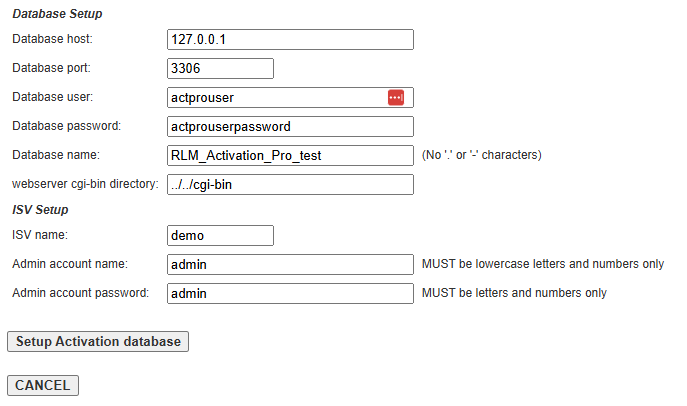
Note: Be sure to update the database user/password, and the Admin account name/password to the correct values for your environment.
Click “Setup Activation database”.
You can ignore this warning:
WARNING: chmod 0444 of RLM_Activation_Pro.pdf failed.
Please change permission by hand.
Click “Next - Clean up Installation Files”
Click “Done - Start RLC”
Post-Setup SELinux Configuration
Phase 2: After browser setup
4. Label the license generator binary for CGI execution
sudo semanage fcontext -a -t httpd_sys_script_exec_t "/var/www/cgi-bin/[^/]+_mklic"
sudo restorecon -Rv /var/www/cgi-bin
actpro_mklic is a CGI binary that Apache must execute at license generation time.
SELinux requires it to be explicitly labelled httpd_sys_script_exec_t before Apache’s
cgid module is permitted to run it. The pattern [^/]+_mklic matches the binary
regardless of ISV name (e.g. demo_mklic, mycompany_mklic).
This rule targets only the binary, leaving the rest of cgi-bin as httpd_sys_rw_content_t
(set in Phase 1). SELinux applies the most specific matching rule, so the binary gets the
exec context while .lic, .gen, and any future uploaded files remain writable by
Apache. This means annual license file and generator settings uploads through the web UI
will continue to work without any SELinux changes.
Activation Pro Configuration
Log into Activation Pro
Navigate to Admin > ActPro License
Choose and upload your Activation Pro license file
Navigate to Admin > Generator Settings
Choose and upload your generator settings file (.gen)